General Form Maintenance
Note: editing forms during an active registration period is not recommended.
Form Changes
Generally, changes to forms can be made according to Gravity Forms standard practices. Some form fields (and thus their entered values) are tied to data in other forms and those relationships must be maintained for the process to function properly.
Form fields that are passed in URLs, either in Notifications, Confirmations, admin links, etc. should be managed with care. Data passed in URLs are passed as name=value pairs. The name is from the Field Name in the Advanced tab of the field editing box of the form being linked to (for example Supplemental Materials Upload forms).
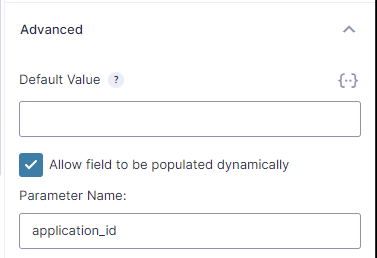
The value should be passed using merge tags to get the form entry value from the form being submitted (usually the primary Program Application).

The fields that require the most care when changing are name and contact information for applicants, parents, counselors, mentors, etc. Application ID (application_id) fields should not be changed.
Do not edit payment fields.
Fields related to to managing Entries:
Many of the tools in the sidebar for managing Entries have corresponding form fields. As many of these as possible are ‘self service’ in that they may be changed as needed. However, be aware that changes to even these fields can impact reporting consistency. Also, fields that may be edited generally cannot be removed and then re-added without updates to the codebase.
- Any of the fields related to the Status and Decision metabox can be edited except the “Transfer To” menu choices.
- Do not change any fields related to the Recommendation Approvals metabox.
- Do not change any fields related to the Document Approval metabox.
Document Management
The Application Submission Notification contains a link to the Supplemental Materials Upload form. That link is manually maintained. It must append specific information to the query string for the correct documents to be tracked to the correct RISE Application. Please note that all these values can and should be set using the merge tags.
The essential names in the query string are the ‘application_id’ – this should be set to the ‘entry_id’ of the Program Application being submitted (RISE, HSH, etc), and the ‘form_id’ – this should be set to the ‘form_id’ of the same Program Application. The ‘citizenship’ is also required in order to display the proper document requirements. This value should be set to the Applicant Citizenship entry value. The query string should also contain ‘firstname’, ‘lastname’, ’email’, ‘parentemail’, ‘addresstype’, and ‘nickname’ fields to ensure notifications are sent properly.
The names in the query string correspond to the field names for specific fields that will be pre-populated in the various linked forms. In this case in the Supplemental Materials Upload form but also in the recommendations and application fee submissions. The field name settings are in the Advanced tab for the individual fields.
The status of document submission and document approval are managed in the Document Approval metabox in the individual Entry screen of the Program Application. The list of documents and their approval status is generated based on the Supplemental Uploads form. Links to posted documents are generated in the codebase.
Administrators have the ability to add documents to an application on behalf of an applicant. There is a link in the Document Approval metabox in the individual Entry screen which takes the admin to the Supplemental Materials Upload form. This link is generated in the codebase so any updates or problems here require webteam help.
Recommendation Management
The status of teacher/counselor recommendations are managed in the Recommendation Approvals metabox in the individual Entry screen of the Program Application. Links to submitted recommendations are generated in the codebase.
With the exception of the fields referenced above (names, email, application_id, etc.) the recommendation forms can be edited freely. Keep in mind, however, that changing the the questions will impact reporting.
Notification Management
The {embed_url} merge tag adds the URL of the page from which the form is submitted. Use this merge tag when generating links in document notifications sent from the primary Program Applications. Links should be in the form:
<a href="{embed_url}upload/? . . .">
Recommendation Notifications start with.
<a href="{embed_url} . . .">